Using CAS BACnet Explorer on Networks Where Broadcast Traffic Is Blocked
CAS BACnet Explorer is commonly used to discover, explore, and test BACnet devices on a network. In many environments, however, network administrators restrict or block broadcast traffic for security or performance reasons. This often raises the question of whether CAS BACnet Explorer can still be used effectively when BACnet broadcast messages are not permitted.
This article explains how broadcast traffic affects BACnet discovery, what limitations apply when broadcasts are blocked, and how CAS BACnet Explorer can still be used in these environments. For more information about the tool itself, see the CAS BACnet Explorer product page.
How BACnet Discovery Uses Broadcast Messages
BACnet device discovery relies on two standard BACnet services known as Who-Is and I-Am. These services are typically implemented using broadcast messages. When a BACnet client sends a Who-Is request, all devices on the local BACnet network segment receive the message and respond with an I-Am message that identifies the device.
Because these discovery services depend on broadcast communication, blocking broadcast traffic prevents CAS BACnet Explorer from performing automatic discovery. In this situation, the tool cannot automatically locate devices or enumerate objects using standard discovery workflows.
What Still Works Without Broadcast Traffic
Although automatic discovery is affected, CAS BACnet Explorer can still communicate with BACnet devices once their details are known. After a device or object has been added to the tool, communication no longer depends on broadcast messages.
In these cases, CAS BACnet Explorer communicates directly with the target device using unicast BACnet messages. This allows users to poll devices for object lists, read property values, and write supported properties, provided that the network allows direct point-to-point communication.
As a result, CAS BACnet Explorer remains useful for testing, monitoring, and troubleshooting BACnet devices on networks where broadcast traffic is restricted.
Manually Adding Devices and Objects
When broadcast-based discovery is unavailable, BACnet devices and objects can be added manually within CAS BACnet Explorer. This is done through the discovery dialog by specifying the required device and network parameters.
To manually add a device or object, users must know specific configuration details such as the network type, IP address or MAC address, network number, device instance, object type, and object identifier. Once this information is entered, CAS BACnet Explorer can establish direct communication with the device.
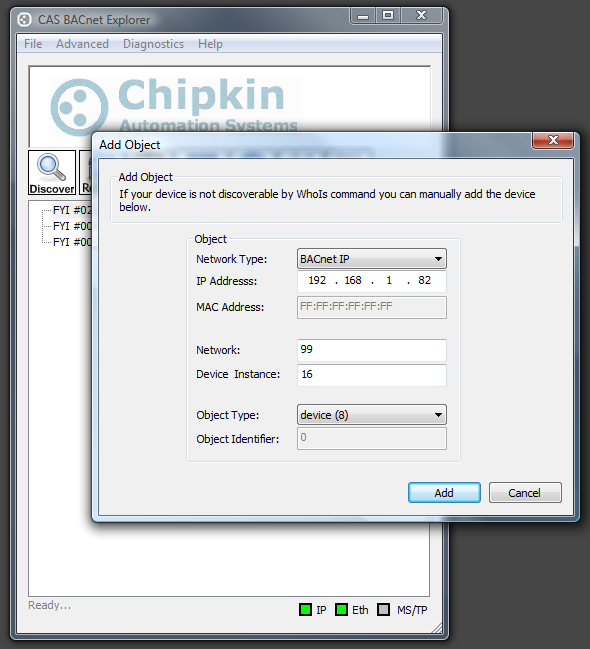
This manual approach is commonly used in segmented networks, secured environments, or routed BACnet/IP deployments where broadcast traffic is intentionally limited.
FAQ
Can CAS BACnet Explorer work without broadcast traffic?
Yes. Automatic discovery will not function, but direct communication with known devices is still supported.
Why does discovery fail when broadcasts are blocked?
BACnet discovery relies on Who-Is and I-Am services, which typically use broadcast messages.
How do I connect to devices on a restricted network?
Devices and objects can be added manually by entering their network and addressing information.
What operations are supported after manual configuration?
Users can read object lists, read property values, and write supported properties using direct BACnet communication.