CAS BACnet Explorer: Writing to a Binary Output
In BACnet, a Binary Output (BO) object typically uses the BACnetBinaryPV data type for its Present Value. This data type is defined as an ENUMERATED value with two possible states: inactive and active.
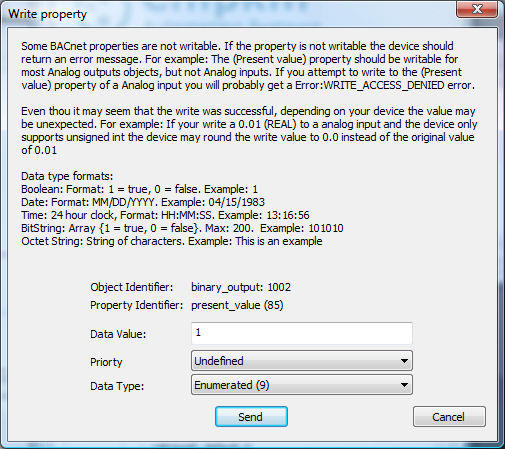
When writing to a Binary Output using CAS BACnet Explorer, it is important to select the correct data type and value to ensure the write is accepted by the target device.
BACnetBinaryPV Data Type
The BACnetBinaryPV data type is defined in the BACnet standard as follows:
BACnetBinaryPV ::= ENUMERATED { inactive (0), active (1) }
This means the Present Value of a Binary Output must be written as an ENUMERATED value, where:
- 0 = inactive
- 1 = active
Writing a Binary Output in CAS BACnet Explorer
In CAS BACnet Explorer, configure the write request as follows:
- Set the Data Type to ENUMERATED
- Set the Data Value to 0 (inactive) or 1 (active)
Using the correct data type is critical. Writing a numeric or boolean type instead of ENUMERATED may cause the device to reject the write.
Frequently Asked Questions (FAQ)
What data type should I use to write to a BACnet Binary Output?
Use the ENUMERATED data type with a value of 0 (inactive) or 1 (active).
Can I write TRUE/FALSE or 1/0 as a numeric value?
No. Binary Outputs expect an ENUMERATED value defined by BACnetBinaryPV.
Writing an incorrect data type may be rejected by the device.
Does this apply to all BACnet devices?
Most BACnet-compliant devices follow this convention, but device-specific
behavior can vary. Always confirm with the device documentation if a write
is rejected.