Decoding BACnet Traffic on Non-Standard Ports Using Wireshark
 CAS BACnet Explorer:
Available as a free tool for discovering, browsing, and testing BACnet devices.
CAS BACnet Explorer:
Available as a free tool for discovering, browsing, and testing BACnet devices.
BACnet/IP communication is transported over UDP and is not restricted to a single port number. Although the default BACnet/IP port is 47808 (BAC0 in hexadecimal), real-world systems frequently use alternative ports. Common examples include port ranges such as 47808–47817 (BAC0–BAC9), particularly in multi-network or multi-tenant environments.
When BACnet/IP traffic uses a non-default UDP port, packet analysis tools such as Wireshark may not automatically decode the traffic as BACnet. In these cases, manual protocol decoding must be configured so that the captured packets are interpreted correctly.
BACnet/IP and Non-Standard Ports
Wireshark determines protocol decoding primarily based on well-known port numbers. If BACnet/IP traffic is observed on a UDP port other than 47808, Wireshark will typically classify the packets as generic UDP data. This prevents BACnet-specific fields and services from being displayed.
BACnet/IP packets include a mandatory header known as BVLC (BACnet Virtual Link Control). This header encapsulates all BACnet/IP messages and allows Wireshark to correctly interpret the remaining payload once decoding is explicitly assigned.
Configuring Wireshark to Decode BACnet Traffic
The steps below describe how to instruct Wireshark to decode traffic on a non-standard UDP port as BACnet/IP. These steps apply whether the packets were captured live or loaded from a saved capture file.
- Start Wireshark.
- Capture live traffic or open a capture file that contains BACnet/IP packets on a non-standard UDP port.
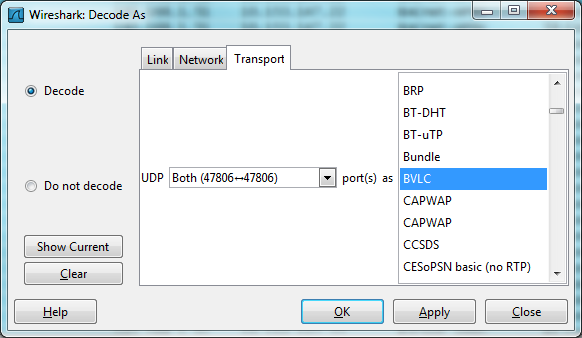
- From the Analyze menu, select Decode As….
- Select the relevant UDP port number from the list of available ports.
-
From the protocol selection menu, choose BVLC.
Note: BVLC (BACnet Virtual Link Control) is the required header for all BACnet/IP messages. - Click OK to apply the decoding rule.
Once applied, Wireshark will immediately reprocess the selected traffic and display BACnet/IP protocol fields, services, and object information in the packet details pane.
FAQ
Does BACnet/IP require port 47808?
No. While 47808 is the default, BACnet/IP may operate on any UDP port if all devices are configured
consistently.
Why doesn’t Wireshark decode BACnet automatically?
Wireshark relies on known port mappings. Traffic on non-default ports must be manually associated with the
BACnet/IP protocol.
What protocol should be selected in Decode As?
The correct protocol is BVLC (BACnet Virtual Link Control), which identifies BACnet/IP traffic.
Is this required for every capture?
The Decode As setting applies to the current capture session or file. It must be reapplied for new captures
unless saved as part of a profile.