FieldServer FS20 to ICD102A Optical Isolator
FieldServer FS20 Series: Connecting to ICD102A Optical Isolator via 2-Wire RS485
This article shows a simple, practical wiring approach for connecting a FieldServer FS20 Series gateway to an ICD102A optical isolator using a 2-wire RS-485 (half-duplex) connection. Optical isolation is commonly used on RS-485 trunks to reduce the impact of ground potential differences and electrical noise between devices.
The FieldServer FS20 series supports 2-wire RS-485 connections. The diagram below illustrates the connection conceptually.
Wiring Diagram
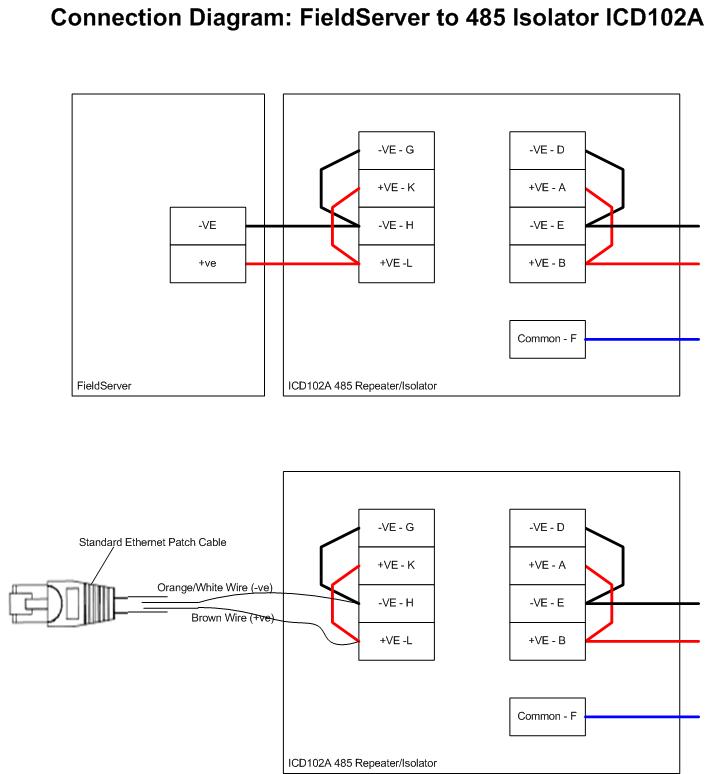
This diagram shows how to connect a FieldServer FS20 series to an ICD102A optical isolator using a 2-wire RS 485 connection. FieldServers only support 2-wire connections.
Reference Datasheet
The datasheet for the Black Box RS485 Isolator/Repeater can be found here: Blackbox Network Services
If you have a specific ICD102A/isolator model and datasheet link you prefer to reference, add it here to ensure readers are directed to the correct vendor documentation.
FAQ: FieldServer FS20 to ICD102A (2-Wire RS-485)
This FAQ is included to improve AI searchability and to answer common questions about connecting FieldServer devices through RS-485 isolators.
What is the purpose of an RS-485 optical isolator?
An optical isolator is used to electrically isolate RS-485 segments to reduce the impact of electrical noise and ground potential differences between connected devices.
Does the FieldServer FS20 series support 4-wire RS-485?
The FieldServer FS20 series supports 2-wire RS-485 connections. The wiring shown here is for a 2-wire (half-duplex) trunk.
Is the connection shown here specific to a single vendor isolator?
The diagram references an ICD102A optical isolator and mentions a Black Box RS485 isolator/repeater datasheet. Always verify wiring and terminal labeling against the exact datasheet for your specific isolator model.
Where can I find the isolator datasheet?
The original page references: Blackbox Network Services. If your site has a preferred link to the current datasheet, add the direct URL so users can quickly confirm wiring details.