Visual Test Shell (VTS) Port Configuration
After configuring BACnet devices and objects in the Visual Test Shell (VTS), the next step is to configure communication ports. A VTS port represents a transport-level connection and must reference an existing Device object in order to communicate.
This article describes how to create and configure ports in VTS, including IP, Ethernet, MS/TP, and PTP connections.
Opening the Ports Configuration Dialog
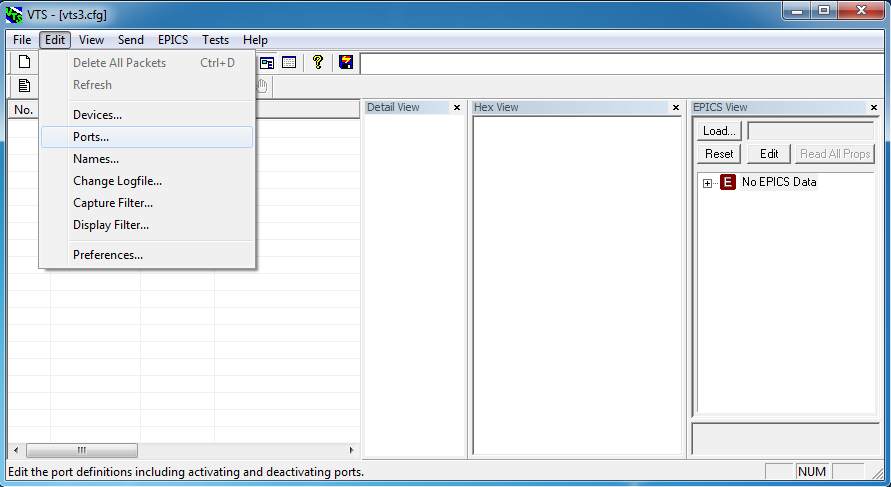
From the VTS menu bar, open the Edit menu and select Ports… to launch the Ports Configuration dialog.
This dialog lists all currently configured ports and provides options to create, edit, or remove port definitions.
Creating a New Port
Click the New button to begin configuring a new port. This opens the New Port Configuration dialog.
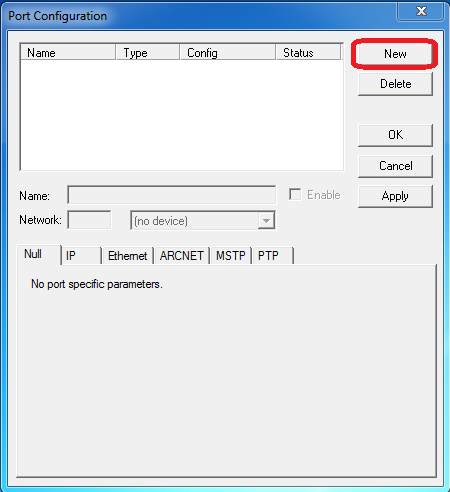
Provide the following basic information:
- Name – A descriptive name used for identification
- Network – The BACnet network associated with the port
Select a configured Device object from the drop-down list to associate the port with a specific BACnet device.
Selecting the Port Type
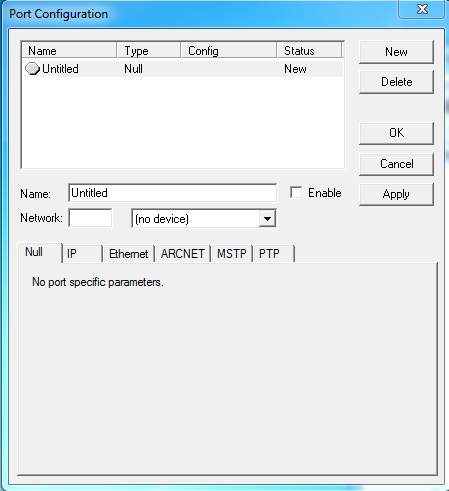
The lower section of the dialog contains tabs that define the port type. Selecting a tab determines the transport used by the port.
The Null tab contains no parameters and is typically unused. The remaining tabs correspond to supported BACnet data link layers.
BACnet/IP and BACnet Ethernet Ports
BACnet/IP
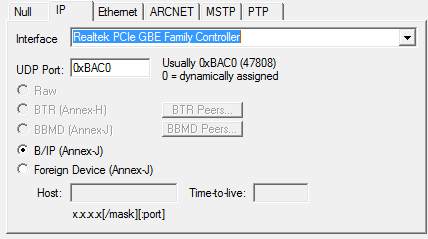
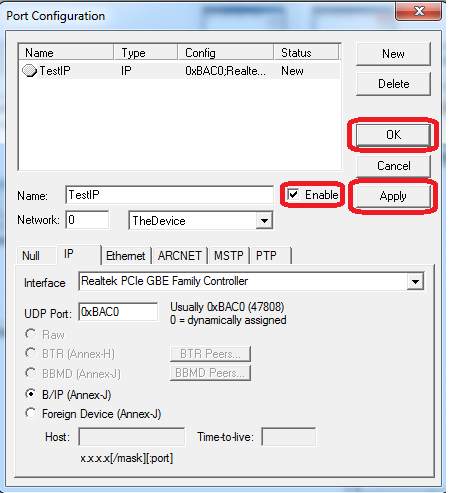
The IP tab configures a BACnet/IP port.
- Interface – Select the network interface card
- UDP Port – Default is 47808 (0xBAC0)
These fields are sufficient for most BACnet/IP configurations.
BACnet Ethernet
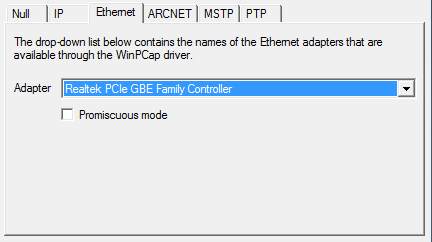
The Ethernet tab configures a BACnet Ethernet port.
- Adapter – Select the Ethernet network interface
- Promiscuous Mode – Enable to receive all frames
BACnet MS/TP and PTP Ports
BACnet MS/TP
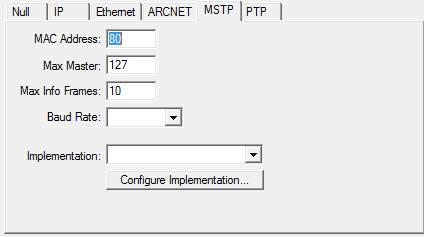
The MS/TP tab configures a BACnet MS/TP serial port.
- MAC Address – Unique MS/TP node address
- Max Master – Highest master address searched
- Max Info Frames – Maximum frames per token
- Baud Rate – Serial baud rate
BACnet PTP
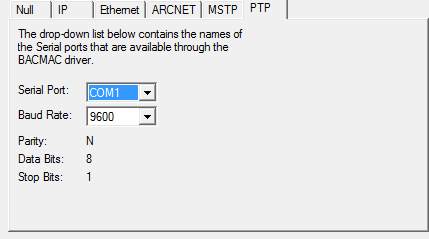
The PTP tab configures a BACnet Point-to-Point serial connection.
- Serial Port
- Baud Rate
- Parity – None
- Data Bits – 8
- Stop Bits – 1
Enabling the Port
Once configuration is complete, check the Enable box and click OK or Apply to activate the port.
After ports are configured, the next step is to configure Names, which associate BACnet object identifiers with readable labels.
FAQ: VTS Port Configuration
What is a port in Visual Test Shell?
A port represents a communication endpoint that allows VTS to exchange BACnet messages with a device over a specific transport.
Does a VTS port require a Device object?
Yes. Each port must reference a configured Device object in order to communicate.
Which BACnet transports does VTS support?
VTS supports BACnet/IP, BACnet Ethernet, BACnet MS/TP, and BACnet PTP.
What happens if a port is not enabled?
Disabled ports do not participate in communication and will not send or receive BACnet messages.