BACnet MS/TP Network Capacity and Device Limits
BACnet Integration Solutions
Chipkin has BACnet solutions for almost every situation. We have over 20+ years experience in BACnet integration, check out our BACnet Products:
This page explains how BACnet MS/TP network capacity is affected by bandwidth, baud rate, device behavior, and protocol overhead. It provides practical guidance for estimating how many devices and data points can be supported on a single RS-485 MS/TP trunk.
This article focuses on performance and capacity. It does not cover addressing conflicts or invalid configurations such as duplicate Device IDs.
MS/TP Bandwidth Fundamentals
BACnet MS/TP operates over RS-485 and uses a token-passing mechanism. Only the device holding the token may transmit, and a significant portion of network bandwidth is consumed by protocol overhead rather than application data.
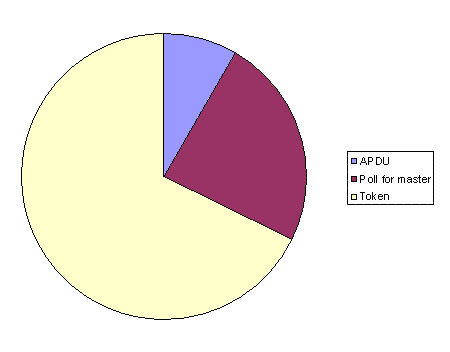
Typical overhead includes token passing, Poll-For-Master messages, and idle timeouts. In real installations, application data often represents a minority of total network traffic.
The chart below illustrates a real-world MS/TP capture showing that most bandwidth is consumed by token management rather than property reads or writes.
Device Roles and Object Counts
Most MS/TP devices are implemented as masters, meaning they participate in token passing. Slave devices never receive the token and cannot initiate communication, but slave mode is rarely supported or configurable.
The number of monitored objects and properties has a direct impact on bandwidth. Each property read consumes request and response frames, increasing network load as polling frequency increases.
As a rough guideline:
- Single property read: ~30 bytes request, ~40 bytes response
- Token or Poll-For-Master frame: ~8 bytes
- Protocol overhead often consumes ~50% of available bandwidth
Baud Rate and Max Master Settings
Baud rate determines the raw throughput of an MS/TP trunk. Dividing the baud rate by 10 provides an approximate bytes-per-second value.
The Max Master parameter controls the highest MAC address that devices search when looking for peers. Higher values increase Poll-For-Master traffic and consume bandwidth through timeouts.
Reducing Max Master can significantly improve performance, but it must be configured consistently across all devices on the trunk.
Optimizing MS/TP Network Capacity
Several protocol features can dramatically reduce bandwidth usage:
- ReadPropertyMultiple / WritePropertyMultiple services
- Change of Value (COV) subscriptions
- Reducing polling frequency where possible
COV allows clients to receive updates only when values change, eliminating constant polling and significantly reducing network traffic.
Device behavior also matters. BACnet allows up to 15 ms of token hold time. Devices that release the token quickly consume less bandwidth than those that use the full allowance.
FAQ: BACnet MS/TP Network Capacity
How many devices can be installed on a single MS/TP trunk?
There is no fixed limit. Capacity depends on baud rate, polling frequency, object count, protocol overhead, and device behavior.
Why does MS/TP bandwidth get consumed so quickly?
Token passing, Poll-For-Master traffic, and idle timeouts consume a large portion of available bandwidth even when little application data is exchanged.
Does increasing baud rate always improve performance?
Higher baud rates increase raw throughput but do not eliminate protocol overhead. Poor configuration can still result in congestion.
Is COV better than polling?
Yes. When supported, COV dramatically reduces traffic by eliminating unnecessary polling.
Should Max Master always be left at 127?
No. Reducing Max Master to match the highest MAC address on the trunk can significantly improve network efficiency.