INTRODUCTION
The CAS BACnet CLI is a powerful command-line utility designed for Windows and Linux platforms. It provides a means for discovering, reading, writing, and commanding BACnet IP devices from the command line or scripting.
This tool is intended for advanced users who are familiar with BACnet protocols and command-line tools and wish to automate interactions with BACnet devices for purposes like regression testing, unit testing, and scripting device interactions.
- Automation-Friendly – Ideal for integrating into scripts to automate BACnet interactions.
- Testing and Diagnostics – Designed for use in unit tests and regression tests of BACnet server interfaces
- Comprehensive Command Set – Includes commands for device discovery, object manipulation (read,write), time synchronization, subscriptions, etc…
- Cross-Platform Support – Available for both Windows and Linux.
Downloads
Please read the License Agreement before downloading this utility.
 CAS
BACnet CLI Manual
CAS
BACnet CLI ManualCommon Use Case
These are some examples of common use cases for the CAS BACnet Cli. The tool is designed for use withinany scripting languages such as bash, powershell, python, node, etc….
Unit and Regression testing
One of the primary uses of CAS BACnet CLI is for scripting unit and regression tests for BACnet serverinterfaces.
Unit and regression testing help identify bugs early, improve code quality, and ensure that new changesdon’t break existing functionality. These tests enhance development efficiency, reduce maintenancecosts, and increase confidence in code changes.
Example simple write, read test scenario:
- Send a write property command to set a property (e.g., Present Value) of a device.
- Immediately perform a read property command to confirm that the value was set correctly.
Example commendable object write, read test scenario:
- Send a write property command to commendable property (e.g., Present Value) with a priority of 8
- Send a read property command to confirm that the value matches the value at priority 8
- Send a write property command to commendable property (e.g., Present Value) with a priority of 12
- Send a read property command to confirm that the value matches the value at priority 8
- Send a write property command to commendable property (e.g., Present Value) with a priority of 8 and a value of NULL
- Send a read property command to confirm that the value matches the value at priority 12
- Send a write property command to commendable property (e.g., Present Value) with a priority of 12 and a value of NULL
- Send a read property command to confirm that the value matches the value for the relinquish default value
This kind of testing ensures that the system behaves correctly under different scenarios, and the automation of these tests simplifies the process
Automation of BACnet Device Interactions
Automating interactions with devices is straightforward with CAS BACnet CLI. This can save time and improve reliability by reducing the need for manual intervention.
Example Script:
- Write to set the motor state to "Stop".
- Write to set the motor speed.
- Write to set the motor direction.
- Write to set the motor state to "Start".
This enables a single command to control the motor, eliminating the need for multiple manual write commands.
Logging Values Over Time
For monitoring and logging, a scheduled task (Windows) or cron job (Linux) can be used to periodically execute a script that reads values from BACnet devices and stores them in a CSV file or inserts them into a database. These logs can later be analyzed, converted into graphs, or used for tracking changes over time
Supported Operating Systems
This tool should function on most Windows and Linux operating systems. Below is a table of the operating systems and versions that this tool has been tested on.
- Windows - Windows 10, 11
- Linux - Ubuntu 20, Ubuntu 22
Supported Output formats
The CAS BACnet Cli tool supports many output formats for different scenarios.
- XML - Machine readable format. Useful for scripting or webhooks.
- Values only - Only the values, useful for injection into other scripts or tools.
- Human readable - (Default) Full text description, useful for a user to read.
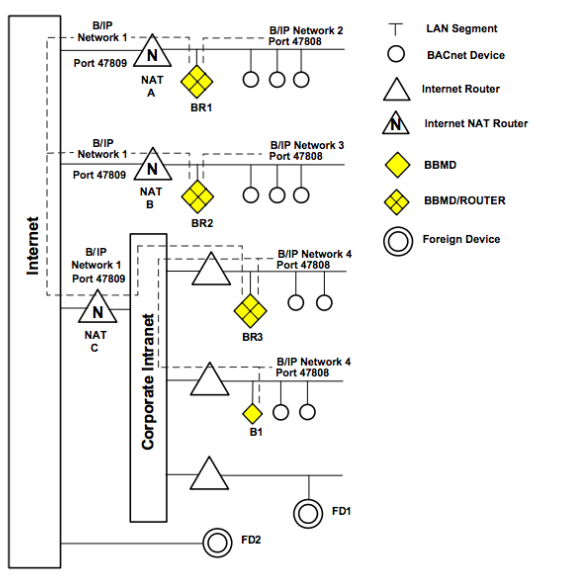
Example of human readable outputs
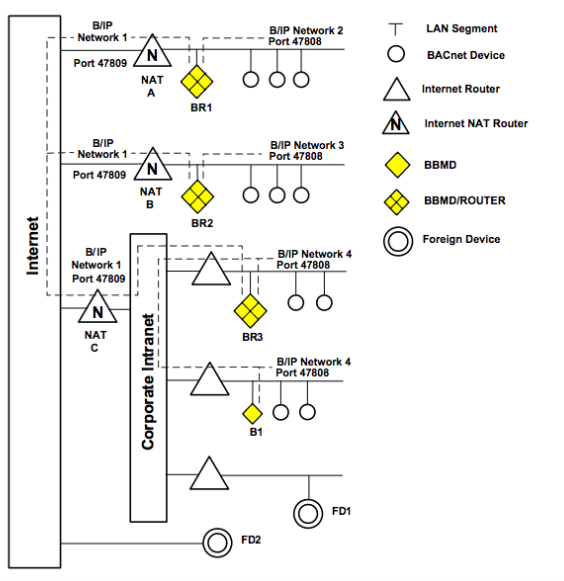
Block Diagram
Below is a network diagram for the CAS BACnet Cli.
BACnet for Field Technicians (Free!)
Learning about BACnet? Want to update your BACnet knowledge? This free EBook will guide you through basicand advanced BACnet topics.
You can purchase a hard copy of this book from Amazonor you can download the BACnet for Field Technicians for free from our website.
Thanks for choosing Chipkin’s protocol gateways, data clients,Software, andintegration services to meet your building and industrial automation requirements!
Chipkin™ is a building and industrial automation protocol expert. We develop, configure, install and support gateways (protocol converters), data loggers, and remote monitor and controlling applications. Founded in October 2000, Chipkin provides expert solutions for converting BACnet® and many other protocols — and enabling interfaces for HVAC, fire, siren, intercom, lighting, transportation, and fuel systems. The high-quality products we offer (including those from other vendors) interface with many protocols, so you can rest assured that we will select the most appropriate solution for your application.
With Chipkin you are buying a solution. Our configuration expertise in this field combined with free BACnet and other tools ensure your success; and our customer support via phone, e-mail and remote desktop tools means that we’re there when you need us. Chipkin is a small responsive company, and we live or die by the quality of our service—and with offices in two-time zones—we can provide support when you need it. Give us a call now!
Customer Support
Chipkin is proud to provide support for the products we sell. For technical support, sales, and customer service, please contact us at 1 (866) 383-1657