Chipkin Modbus Explorer: TCP & RTU Diagnostic Tool
 Chipkin Modbus Explorer (CAS-1000-20):
A Free modern desktop utility for discovering, polling, simulating, and troubleshooting Modbus TCP and Modbus
RTU devices.
Chipkin Modbus Explorer (CAS-1000-20):
A Free modern desktop utility for discovering, polling, simulating, and troubleshooting Modbus TCP and Modbus
RTU devices.
Model: CAS-1000-20 | Platforms: Windows + Linux
Check out our complete Modbus Solutions Here!
INTRODUCTION
Chipkin Modbus Explorer is a cross-platform desktop application built for system integrators, controls technicians, and automation engineers who need a fast, reliable way to work with Modbus networks. It combines three tools into one workflow: a Modbus Client (for direct read/write testing), a Device Discovery utility (for quickly finding devices and identifying valid registers), and a Modbus Simulator (for testing client/master apps when hardware isn’t available).
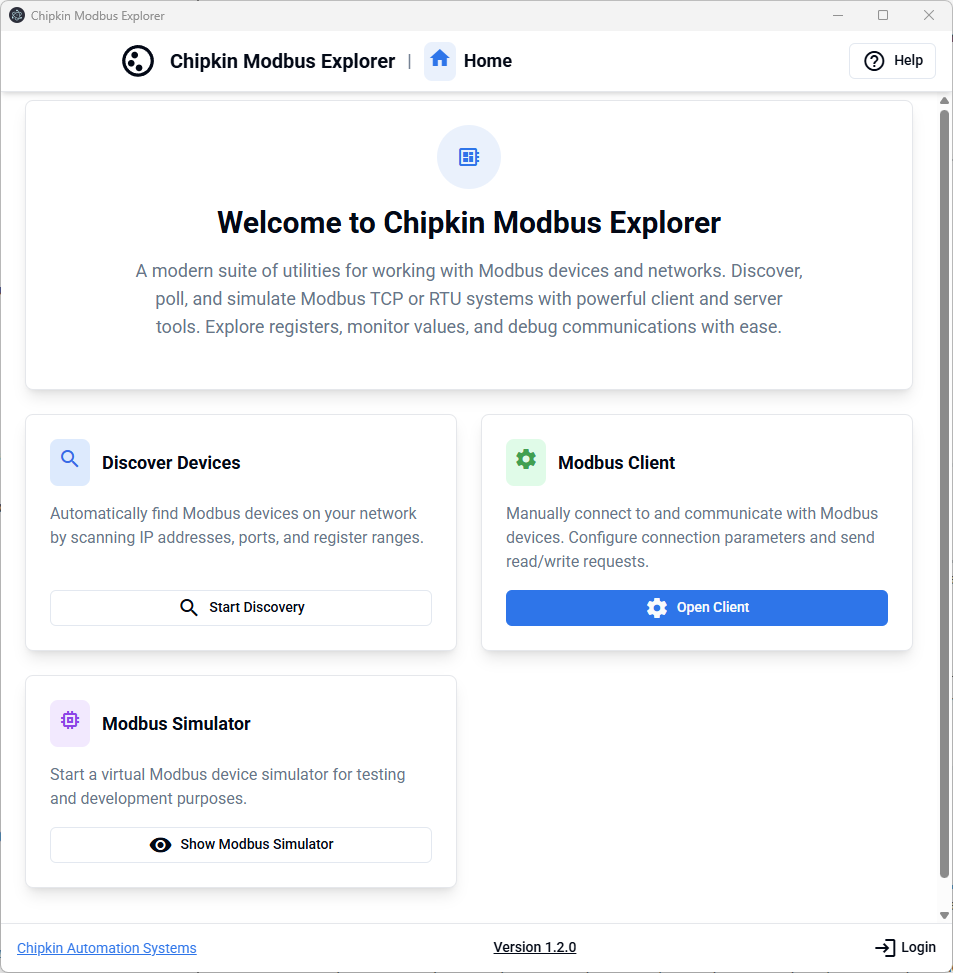
- Modbus Client – Connect to Modbus TCP or RTU devices and perform read/write requests with full decoding.
- Discovery – Scan IP ranges / subnets (TCP) or iterate serial permutations (RTU) to locate devices and map registers.
- Simulator – Emulate a Modbus server to test SCADA/HMI/client applications without physical devices.
The interface is designed to make Modbus diagnostics practical: simultaneous views of raw hex and decoded values, and quick iteration across data types and byte/word order when registers don’t decode cleanly.
Downloads
Documentation: Download the Chipkin Modbus Explorer manual (CAS-1000-20) below.
 Chipkin Modbus Explorer Manual (PDF)
.png)
Want help selecting the right converter, gateway, or integration approach? Contact Chipkin and we’ll help you choose the best-fit Modbus solution for your application.
FEATURES
Chipkin Modbus Explorer is organized around the three real-world tasks you face with Modbus: connect & test, discover unknown devices, and simulate servers for development. The tool supports Modbus TCP (Ethernet) and Modbus RTU (Serial/RS-485), and is designed to accelerate diagnostics when device documentation is incomplete or inconsistent.
- Protocols: Modbus TCP and Modbus RTU
- Function Codes: FC01, FC02, FC03, FC04, FC05, FC06, FC15, FC16
- Data Types: INT16 / UINT16, INT32 / UINT32, INT64 / UINT64, FLOAT32, DOUBLE, ASCII strings
- Endianness: Big Endian, Little Endian, and byte/word swapped decoding
- Import/Export: CSV register maps for documentation and reuse
- Visualization: Raw hex + decoded values side-by-side for rapid troubleshooting
- Address management: Quick conversion between public (1-based) and protocol (0-based) addressing
- Logging: Message-level insight into requests/responses for diagnosing timeouts and exceptions
- Cross-platform: Windows and Linux (Ubuntu 18.04+)
- Modern desktop UX: Built on a modern Electron/TypeScript stack for stability and maintainability
Chipkin Modbus Explorer Block Diagram
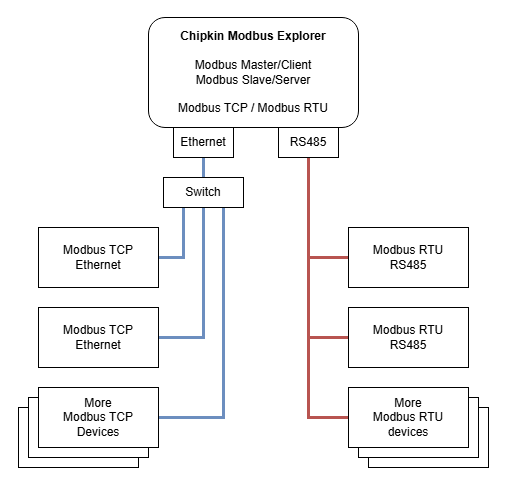
Modbus Client
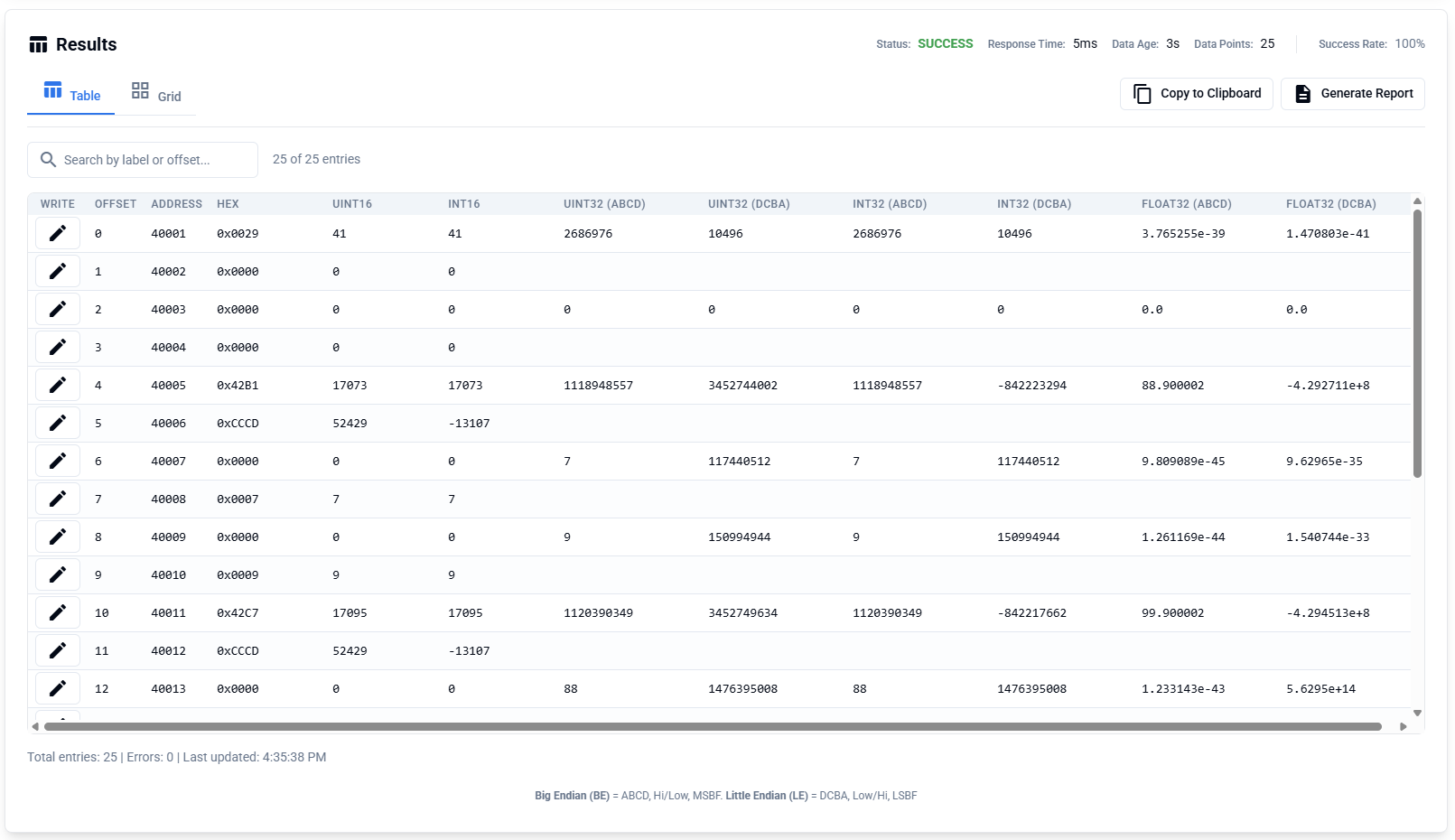
Use the Modbus Client to connect to a device and read/write data directly. Chipkin Modbus Explorer is designed to remove the most common friction points in Modbus commissioning: decoding multi-register values, correcting byte/word order, and validating register offsets quickly.
The client supports flexible decoding across multiple data types, and provides immediate visibility into raw register values and their interpreted meaning. This is especially useful when device manuals list values in “public” addressing (e.g., 40108) but the protocol requires 0-based offsets.
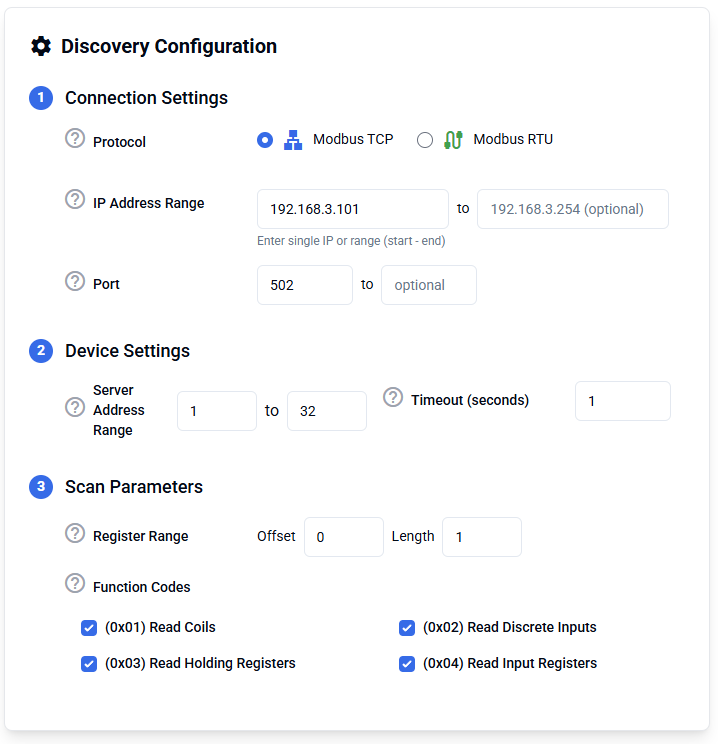
Device Discovery
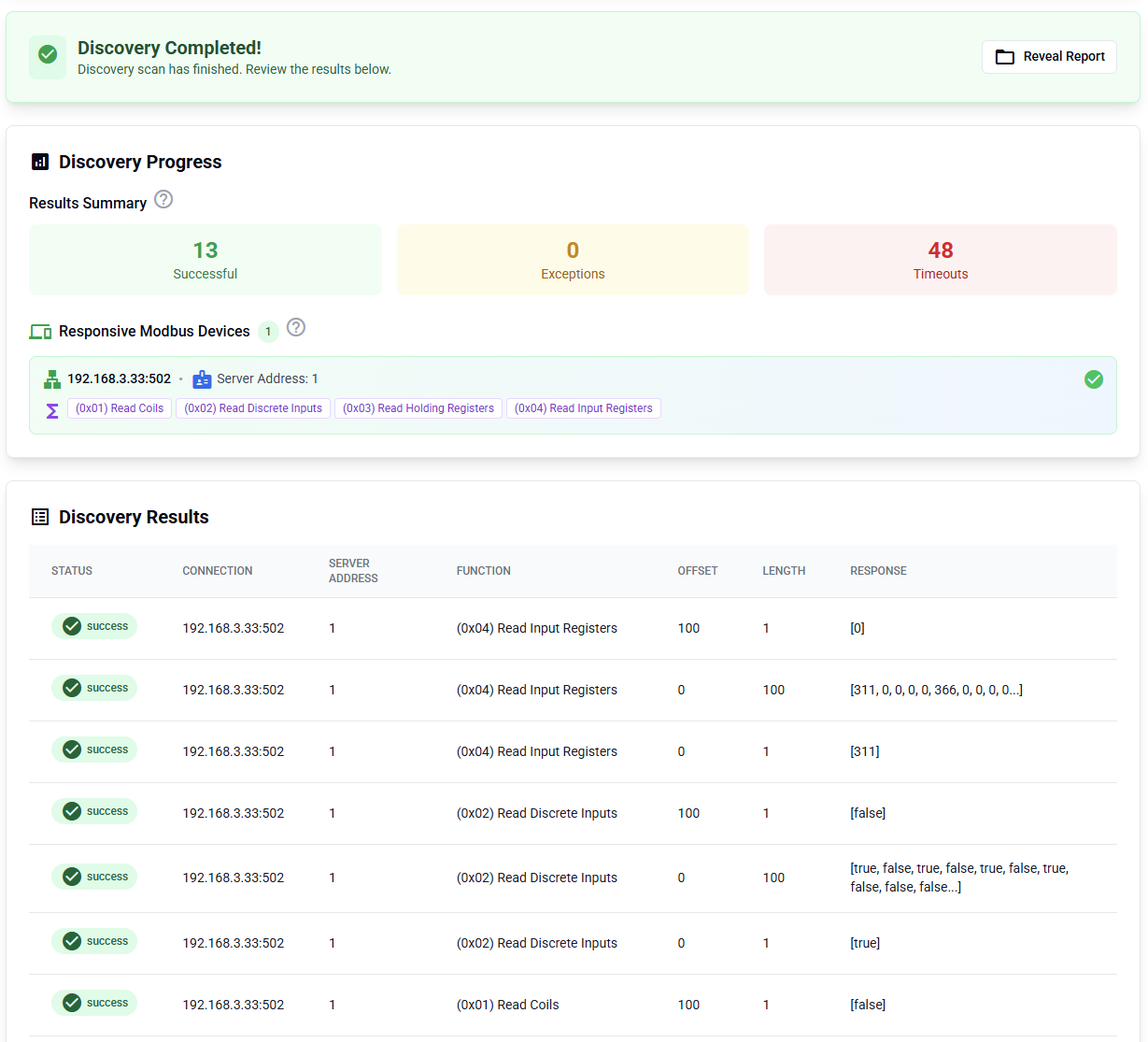
The Discovery tool scans for Modbus devices and helps identify which unit IDs and registers are active. For Modbus TCP, scan a CIDR subnet or IP range. For Modbus RTU, iterate serial settings (baud/parity) to find responsive nodes on RS-485.
Chipkin Modbus Explorer can also scan address ranges to determine which function codes and registers respond, helping you build a register map even when documentation is missing.
Results Table + Decoding
Discovery results are presented in a clear table for quick filtering and validation. Once you find responsive ranges, you can move the discovered points into the Modbus Client, refine data types and byte order, add labels, and export a clean CSV register map for reuse across projects.
Modbus Simulator
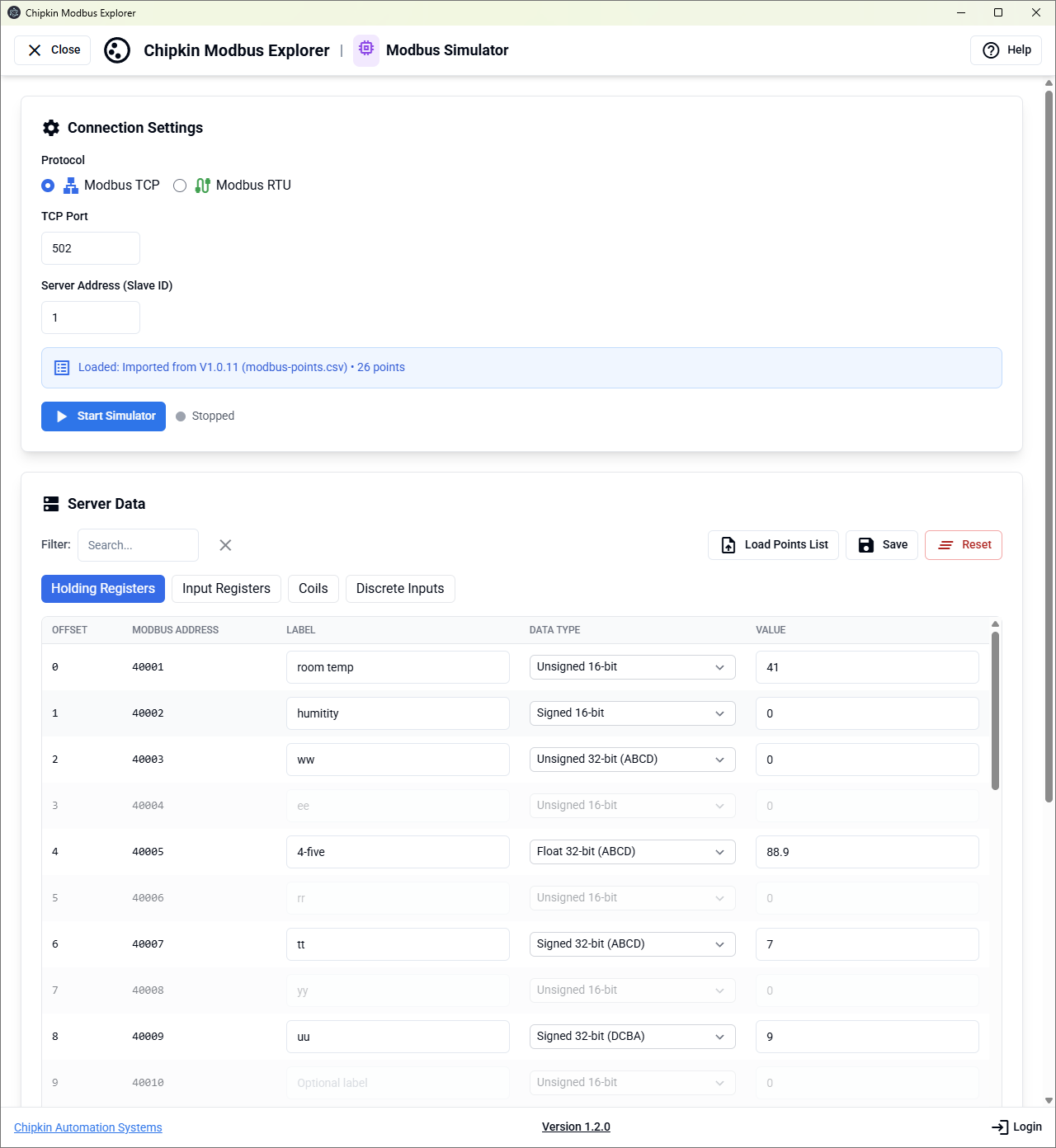
The Modbus Simulator emulates a Modbus TCP or RTU server so you can test master/client applications without hardware. It’s ideal for validating SCADA/HMI polling behavior, verifying function code handling, and reproducing edge cases in a controlled environment.
Use Case: Legacy System Discovery
Scenario: A facility contains undocumented Modbus devices across Ethernet and Serial networks.
Solution:
- Scan: Configure an IP range (e.g.,
192.168.1.0/24) or serial parameters and run Discovery. - Identify: Iterate unit IDs and connection settings to locate responsive nodes.
- Map: Scan address ranges (coils, discrete inputs, input registers, holding registers) to find valid points.
- Analyze: Use the results table to select data types and endianness (e.g., Float32 temperature values).
- Export: Generate a CSV register map for documentation and SCADA integration.
Thanks for choosing Chipkin's protocol gateways, data clients, software, and integration services to meet your building and industrial automation requirements!
Chipkin™ is a building and industrial automation protocol expert. We develop, configure, install and support gateways (protocol converters), data loggers, and remote monitoring/controlling applications. Founded in October 2000, Chipkin provides expert solutions for converting BACnet®, Modbus®, and LonWorks®—to name just a few—and enabling interfaces for HVAC, fire, siren, intercom, lighting, transportation, and fuel systems.
With Chipkin you are buying a solution. Our configuration expertise combined with free tools ensures your success. Our customer support via phone, e-mail, and remote desktop tools means that we're there when you need it.
Customer Support
Chipkin is proud to provide support for the products we sell. For technical support, sales, and customer service, please contact us at 1 (866) 383-1657