BACnet - What is CAS BACnet Watchdog
This tool is out of date and is no longer supported. It is not recommended for use on modern operating systems or production networks.
CAS BACnet Watchdog was a diagnostic utility designed to monitor and record BACnet network traffic, with a focus on identifying which devices were reading from or writing to specific BACnet objects. It was primarily used in troubleshooting scenarios where unexpected or unauthorized BACnet messages were affecting system behavior.
In BACnet systems, it is not uncommon for multiple devices to interact with the same objects. When configuration errors, device faults, or unintended interactions occur, object values such as temperature setpoints, operating modes, or control outputs can be overwritten without an obvious source. CAS BACnet Watchdog was created to help engineers identify the origin of those messages.
Although CAS BACnet Watchdog is no longer actively maintained or supported, understanding its purpose and capabilities remains useful for historical reference and for understanding modern BACnet troubleshooting workflows.
What CAS BACnet Watchdog Was Designed to Do
CAS BACnet Watchdog monitored BACnet packets on a network and logged BACnet messages associated with specific devices, objects, or message types. By observing live BACnet traffic, it allowed users to determine which devices were issuing read or write requests and when those requests occurred.
A common use case involved diagnosing unexpected changes to BACnet object values. For example, in a BACnet/IP network with dozens of devices, a thermostat setpoint might repeatedly change without user intervention. By monitoring write requests to that object, CAS BACnet Watchdog could identify the device responsible for the change, allowing integrators to isolate, repair, or replace the source.
The tool supported monitoring across BACnet/IP and BACnet/Ethernet (802.3) networks and could be configured to observe individual devices or the entire network, depending on the troubleshooting requirements.
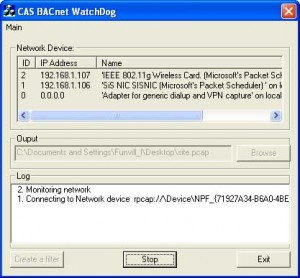
Key Capabilities and Technical Scope
CAS BACnet Watchdog provided a focused set of monitoring features aimed at visibility rather than control. It did not modify BACnet traffic or act as a BACnet client or server; instead, it passively observed and recorded network messages.
Core capabilities included:
- Monitoring BACnet read and write requests
- Filtering and flagging specific BACnet message types
- Observing traffic from selected devices or across the full network
- Simultaneous monitoring of BACnet/IP and BACnet/Ethernet (802.3)
- Logging activity for later analysis
As a packet-monitoring tool, its effectiveness depended on network access and visibility. It relied on packet capture technology and required compatible network hardware and drivers. These dependencies, along with operating system constraints, ultimately limited its long-term viability.
System Requirements and Support Status
CAS BACnet Watchdog was originally designed for older Windows operating systems and required packet capture drivers that are no longer commonly used in modern environments.
Historical requirements included:
- Windows XP or Windows 2000
- Approximately 10 MB of free disk space
- A WinPcap-supported network interface card (WinPcap)
If you are experiencing BACnet communication or control issues today, more modern and actively supported tools should be used instead.
CAS BACnet Explorer
For current BACnet diagnostics, discovery, and testing, Chipkin recommends using CAS BACnet Explorer. CAS BACnet Explorer is an actively supported tool designed for browsing BACnet networks, discovering devices, inspecting objects, and testing BACnet services in a controlled and configurable way.
While CAS BACnet Explorer does not operate as a passive packet sniffer, it provides extensive visibility into BACnet behavior through standard protocol services and configurable request options that support troubleshooting and interoperability testing.
More information about CAS BACnet Explorer is available here:
https://store.chipkin.com/products/tools/cas-bacnet-explorer
Frequently Asked Questions (FAQ)
What was CAS BACnet Watchdog used for?
It was used to monitor and log BACnet network traffic in order to identify which devices were reading
from or writing to BACnet objects.
Could CAS BACnet Watchdog change BACnet values?
No. It was a monitoring tool only and did not issue BACnet control commands or modify network traffic.
Is CAS BACnet Watchdog still supported?
No. The tool is out of date and no longer supported. It is not recommended for use on modern systems.
What should I use instead of CAS BACnet Watchdog?
For modern BACnet diagnostics and testing, CAS BACnet Explorer is the recommended tool.
Can CAS BACnet Explorer fully replace Watchdog functionality?
CAS BACnet Explorer provides active BACnet diagnostics and visibility through protocol services,
but it does not function as a passive packet sniffer. It is suited for most modern troubleshooting
and commissioning workflows.