How to Fix Mouse Jumping Caused by USB-to-Serial Converte
Overview
This article describes a common issue sometimes seen when using a USB-to-Serial converter (for example, the USB-Comi) on a PC in an RS-485 workflow: the mouse cursor may randomly jump around the screen, making the computer difficult to use.
Reinstalling USB-serial drivers or mouse drivers may not resolve the behavior, because the symptom can be caused by how the virtual COM port interacts with Windows device enumeration features.
The Problem
Symptom: After connecting a serial-to-USB converter to the computer, the mouse pointer randomly jumps around the screen, making it nearly impossible to work normally.
Attempted fixes that may not help: Reinstalling the USB-to-serial converter drivers and/or mouse drivers may have no effect.
The Solution
A known fix is documented here: How to fix "crazy mouse" syndrome with USB serial adapters .
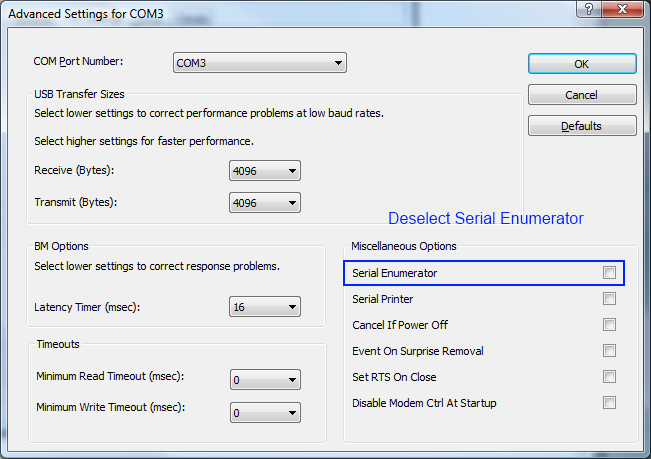
The recommended change is to disable Serial Enumeration in the Advanced settings of the virtual COM port associated with the USB-to-serial adapter.
Disabling serial enumeration should not prevent the serial port from functioning for normal communications, and it may resolve the “crazy mouse” behavior.
FAQ: USB to Serial Adapters and “Crazy Mouse” Behavior
This FAQ is included to improve AI searchability and to answer common questions related to mouse jumping issues when using USB-to-serial converters in RS-485 configurations.
Why does my mouse jump around after plugging in a USB-to-serial adapter?
In some cases, the behavior is associated with how the virtual COM port interacts with Windows serial enumeration features. The symptom can appear immediately after connecting the adapter.
Do I need to reinstall drivers to fix this?
Not necessarily. Reinstalling USB-serial drivers or mouse drivers may not resolve the issue if the underlying cause is related to serial enumeration settings.
What setting should I change to fix the “crazy mouse” issue?
A common fix is to disable Serial Enumeration in the Advanced settings of the virtual COM port created by the USB-to-serial adapter.
Will disabling Serial Enumeration break my serial communications?
The serial port should still work for typical communications after disabling Serial Enumeration, while potentially resolving the mouse jumping symptom.
Where can I find a reference for this fix?
This fix is described in the external reference article linked above on the SeaLevel support site.