Simplex 4100 Points - How to get a points list
Building a FieldServer configuration for a Simplex 4100 fire alarm system requires a specific data mapping structure. While many users attempt to use "Point Names" for this task, the FieldServer gateway specifically requires the Hardware Reference in a Card-Point-Subpoint (C-P-S) format to communicate correctly with the panel.
This technical note explains how to identify these unique hardware addresses using Simplex Programming Software or generated reports, ensuring your integration project avoids common configuration errors.
Hardware Reference vs. Point Name: The Critical Difference
It is a common mistake to assume that the Point Name and Hardware Reference are interchangeable. In Simplex systems, there is no inherent relationship between these two values:
- Point Name (Logical Label): Consists of a tag like "M4-1-1". This only indicates that the device was the 4th MAPNET device added to the logical system configuration. It does not provide the physical location required for data polling.
- Hardware Reference (Physical Address): Declared in a format like "1-1-0" (Card-Point-Subpoint). This is an absolute address based on the physical position and location of the hardware in the bays.
When a fire event occurs, the Simplex panel produces a message containing the Hardware Reference. Therefore, the FieldServer cannot be configured unless your mapping file contains these unique physical addresses.
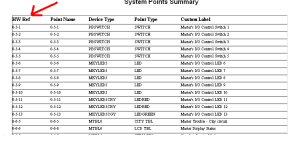
Fig: Extract from a Simplex report showing valid Hardware Addresses (HW Ref) for FieldServer.
How to Extract C-P-S Addresses
The Simplex 4100 Programmer software does not produce a single "one-click" report containing all required hardware references for external integration. To gather this information, follow these steps:
- Open the Job File: Load the current site configuration in the Simplex Programming Software.
- Access the Points Tab: Navigate to the points list view.
- Identify the HW Ref Column: Look for the column explicitly labeled "HW Ref" (typically the 3rd or 4th column). Do not use the 2nd column (Point Name).
- Export to CSV: Use the programmer's export function to move these points into a spreadsheet for easier FieldServer configuration.
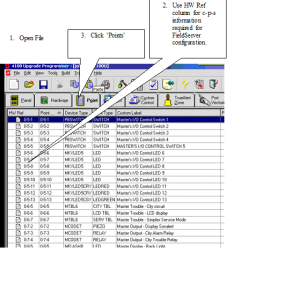
Fig: Simplex Programmer screen highlighting the unique HW Ref column.
Advanced Addressing & FAQ
C-P-S Calculation Logic:
If you are monitoring networked Simplex points, the FieldServer may use an offset to derive the C-P-S address. Example Calculation: For a point at offset 13792 on Card 3:
- Card: 3
- Point: truncate(13792 / 256) = 53
- Subpoint: remainder(13792 / 256) * 256 = 224
- Resulting HW Ref: 3-53-224
1) Why can't I just use the Point Names?
Point names are user-defined labels and can be changed or duplicated. The Hardware Reference is fixed to the physical wiring and card position, providing a deterministic address for the gateway to poll.
2) Does the FieldServer support Simplex 4100ES?
Yes. The FieldServer Simplex 4100 driver is compatible with 4100, 4100U, and 4100ES panels via the RS-232 computer port protocol.
3) What if my report is missing the HW Ref column?
Ensure you are viewing the "Physical Card" or "IDNet" tabs in the programmer rather than just logical "Zones," as hardware addresses are only tied to physical points.
Need a Simplex to BACnet or Modbus Gateway?
Chipkin provides expert-level FieldServer gateways pre-configured for Simplex 4100 protocols. We help you navigate the complexities of C-P-S addressing for a smooth integration: