
Chipkin BACnet SC Hub
BACnet Secure Connect hub software
The Chipkin BACnet SC Hub is the central piece of a secure BACnet network. Every BACnet Secure Connect (BACnet/SC) device makes an encrypted connection to it, and the hub passes messages between them. It runs as software on Windows or Linux, and implements the BACnet/SC Hub (B-SCHUB) device profile.
- All BACnet traffic encrypted
- Certificates from your site's own CA
- B-SCHUB device profile
- Windows 11 and Linux x64
Part number CAS-1000-21
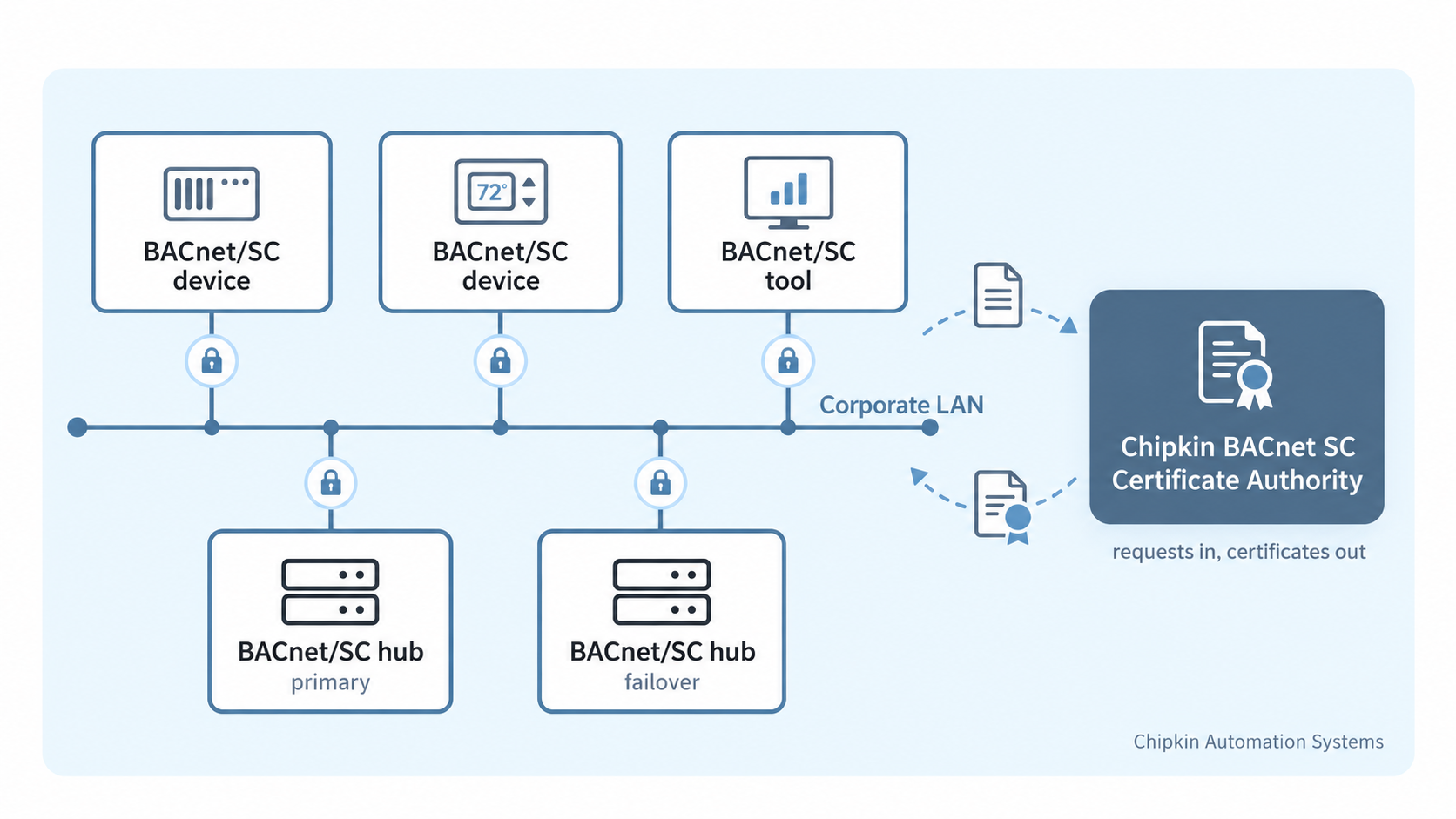
What does a BACnet/SC hub do?
On a BACnet/SC network, each device opens an encrypted connection to a hub, and the hub relays traffic between the devices.
The hub and every device present a certificate signed by a certificate authority (CA) the site trusts. A device joins the network when its certificate comes from that CA.
The Chipkin BACnet SC Hub is that hub, built on the CAS BACnet Stack . A second Chipkin BACnet SC Hub can run as the site's failover hub, and devices connect to it when the primary hub is unavailable.
The hub is for BACnet/SC devices. It does not bring BACnet/IP or BACnet MS/TP devices onto the BACnet/SC network.
What you need for a BACnet/SC site
A BACnet/SC site needs three things: a hub that every device connects to, a certificate authority that signs the certificates, and a certificate on each device. Chipkin supplies the first two.
1. A hub
Every BACnet/SC device connects to it, and it passes messages
between them.
Chipkin BACnet SC Hub
(CAS-1000-21), this product.
2. A certificate authority
It signs the certificate of each hub and each device, on a
computer that needs no network connection.
Chipkin BACnet SC Certificate Authority
(CAS-1000-22).
3. A certificate on each device
Each device presents its own certificate when it connects. The Certificate Authority signs the device's request, or makes the key and the certificate for it.
Features
All BACnet traffic is encrypted
Every connection to the hub is encrypted, and only a device with a certificate from your site's CA can join.
Certificates signed by your site's own CA
The hub makes its own private key and certificate request, and your site's CA signs it. Signing authority stays with that CA.
Remote certificate management
Replace the hub's certificate or add a second trusted issuer over BACnet. Each new certificate is checked before it is used. One that fails is refused, and the hub keeps its current certificates.
Simple configuration
Configure the hub with a configuration file, command-line options, or an interactive set-up guide in your browser.
Live connection diagnostics
The set-up guide shows why a device's connection attempt failed and what to change.
The hub's health on one page
The status page lists each connected device. Each health check reports pass, warning, or fail, with what to do next.
How do I set up the hub?
- Download and run the installer. On a new installation, it makes the hub's private key and its certificate request.
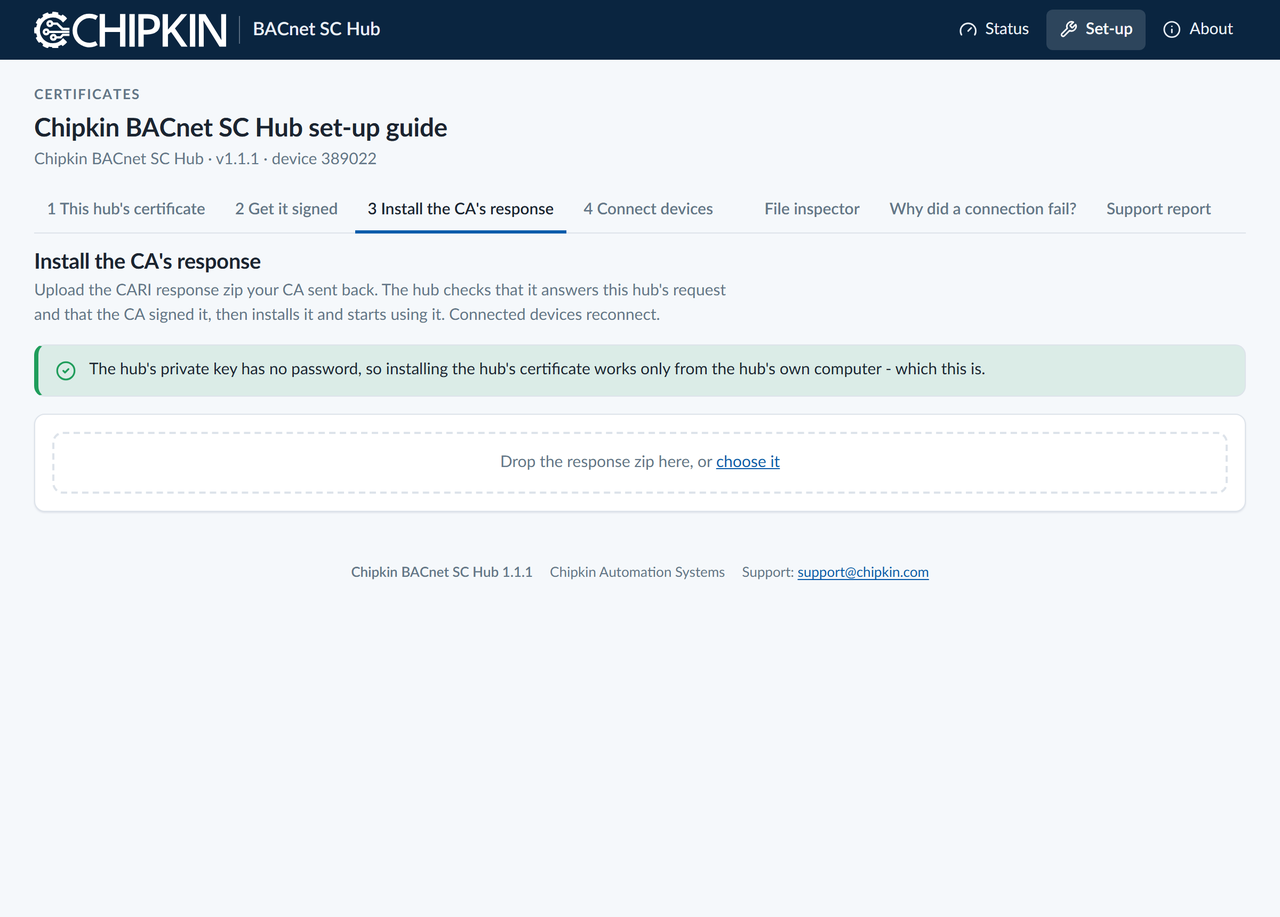
- Start the hub and open the set-up guide in your browser.
- Download the hub's request and have your CA sign it, for example with the Chipkin BACnet SC Certificate Authority .
- Upload the CA's response in the set-up guide.
-
Give each BACnet/SC device its own certificate, the CA's
certificate, and the hub's address,
wss://.:4443/ - Check that the devices appear under Connected devices on the status page.
Chipkin BACnet SC Hub Video
Watch this video for an overview of the Chipkin BACnet SC Hub.
Download
Download the Chipkin BACnet SC Hub for Windows or Linux. For licensing, please contact us .
| Windows 11 or later (x64) |
Installer (.exe)
|
Download the Chipkin BACnet SC Hub for Windows |
|---|---|---|
| Linux x64, Debian or Ubuntu |
Package (.deb)
|
Download the Chipkin BACnet SC Hub for Linux |
System requirements
| Operating system | Windows 11 or later (x64), or Linux x64 with the C library (glibc) of the current Ubuntu LTS release or newer |
|---|---|
| Network |
TCP port 4443 open inbound for BACnet/SC devices.
TCP port 8080 for the status page and set-up guide,
on the hub's own computer only by default. Both ports can be
changed.
|
| Certificate authority |
A CA that signs CARI requests, such as the Chipkin BACnet SC
Certificate Authority (CAS-1000-22)
|
| Web browser | A current web browser, for the status page and the set-up guide |
Specifications
| BACnet device profile | BACnet/SC Hub (B-SCHUB), ANSI/ASHRAE Standard 135-2024, Annex L |
|---|---|
| Protocol revision | 30 |
| Data link | BACnet/SC (Annex AB) hub function, primary or failover hub, with an optional hub connector to another hub |
| Devices served | BACnet/SC devices. BACnet/IP and BACnet MS/TP devices are outside the hub's scope. |
| Security | Transport Layer Security (TLS) 1.3 with mutual certificate authentication; optional certificate revocation lists; connection rate limiting; an audit trail of every connection in the log |
| Certificate files | Certificate Authority Requirements Interchange (CARI) format, Annex AA.2 |
| Monitoring |
/health and /metrics endpoints for
monitoring tools
|
| Part number | CAS-1000-21 |
| BACnet Interoperability Building Blocks (BIBBs) |
NM-SCH-B,
DS-RP-B,
DS-RPM-B,
DM-DDB-B,
DM-DOB-B,
DM-DCC-B
|
| Services executed | ReadProperty, ReadPropertyMultiple, Who-Is, Who-Has, DeviceCommunicationControl, AtomicReadFile, AtomicWriteFile, WriteProperty (certificate procedures only), ReinitializeDevice |
| Objects | Device, Analog Input, Network Port, File (4 certificate files) |
Datasheets and manuals
Sales and customer service
Chipkin is proud to provide support for our products. For technical support, sales, and customer service, please contact us .
- Toll free
- +1 866 383 1657
- [email protected] , [email protected]
- Website
- www.chipkin.com
BACnet® is a registered trademark of ASHRAE.