HDMI High-Definition Multimedia Interface
General Connectors Overview
- VGA Video Graphics Array
- DVI Digital Visual Interface
- HDMI High-Definition Multimedia Interface
- Apple Dock Connector
- BNC Bayonet Neill-Concelman
- Fiber Connectors
- ControlNet Taps
- DeviceNet Connectors
- P… DP
HDMI in Practical Systems and Industrial Environments
HDMI (High-Definition Multimedia Interface) is a digital interface used to transport uncompressed video, multi-channel audio, and a limited set of auxiliary data across a single cable. While HDMI is commonly associated with consumer electronics (TVs, Blu-ray players, and laptops), it is also frequently encountered in industrial and building environments where video distribution and human-machine interfaces (HMIs) are required. Examples include operator workstation displays, digital signage, training rooms, security monitoring stations, test benches, and commissioning laptops connected to control panels or embedded platforms.
From an automation and systems engineering perspective, HDMI is best treated as a high-bandwidth, impedance-controlled digital link that is sensitive to cable quality, connector integrity, and installation practices. Unlike low-speed serial links used for industrial protocols (e.g., RS-485), HDMI carries high-speed differential signals and includes a separate channel for control and identification. This means the mechanical and electrical conditions of the installation (bend radius, strain relief, connector retention, and shielding) can materially affect reliability, especially in environments with vibration, electrical noise, or long cable runs.
HDMI also incorporates device discovery and capability negotiation. A display advertises its capabilities (resolution, refresh rate, color formats, and audio support) to the source device. In the field, this negotiation is a frequent root cause of “no signal” or intermittent link issues when adapters, extenders, or matrix switchers are used. Treating HDMI as a “plug-and-play” cable is often sufficient for short runs in office settings, but in industrial environments the integration details matter.
Connector Types and Form Factors
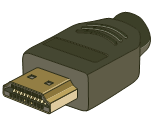
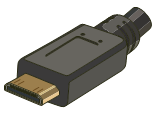
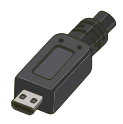
HDMI is defined both by its electrical interface and by its connector form factor. While there are 5 different HDMI connectors, only 3 are widely used. Type A is defined in the HDMI 1.0 specification, type C is defined in the HDMI 1.3 specification, and type D is defined in the HDMI 1.4 specification. In practice, the form factor is usually driven by mechanical constraints and device size rather than performance. Type A is the standard full-size connector seen on most TVs, monitors, industrial PCs, and many embedded controllers. Type C (Mini-HDMI) and Type D (Micro-HDMI) are more common on compact cameras, mobile devices, and small embedded platforms.
When designing panels or selecting devices, consider how the connector will be accessed and protected. Standard HDMI Type A connectors are mechanically larger and generally easier to service, but the cable assembly can place significant leverage on the port if strain relief is not provided. Mini and Micro connectors reduce panel space but are less tolerant to repeated insertions and can be more vulnerable to cable pull-out in vibration-prone environments. In many industrial deployments, the connector choice is less important than ensuring the installation includes a secure cable routing strategy and the correct accessories (locking retention if available, panel mount couplers, or ruggedized HDMI extensions).
Signal Integrity Considerations for Installations
HDMI transport is sensitive to attenuation and reflections. For short distances, passive copper cables are typically sufficient. As distances increase, or where cable routing is challenging, extenders may be used (over twisted pair, fiber, or active copper). In these cases, the “HDMI link” becomes a chain of devices: source → extender/switch → cable medium → extender/switch → display. Each additional element adds potential points of failure and can alter the timing and negotiation behavior.
In building automation and industrial controls contexts, common failure modes include:
- Incorrect resolution/refresh negotiation when using KVMs, splitters, or converters.
- Intermittent video loss due to marginal cable quality, connector wear, or movement/vibration.
- Grounding and shielding issues when HDMI connects devices powered from different circuits.
- Adapter-related problems (e.g., HDMI-to-DVI, HDMI-to-DisplayPort, or HDMI capture devices).
- Unexpected behavior when mixing devices with different HDMI versions and feature sets.
A practical integration approach is to validate the complete signal chain under realistic conditions: confirm stable operation at the intended resolution and refresh rate, verify behavior across power cycles, and, when applicable, test with the exact adapters or extenders that will be deployed. In environments where access is limited (e.g., ceiling-mounted displays or control rooms with long cable runs), performing this validation before installation reduces service calls and downtime.
While there are 5 different HDMI connectors, only 3 are widely used. Type A is defined in the HDMI 1.0 specification, type C is defined in the HDMI 1.3 specification, and type D is defined in the HDMI 1.4 specification. See the table below for more details:
|
HDMI |
|||||
|
Name |
HDMI Type A (19-Pin) |
Mini-HDMI Type C (19-Pin) |
Micro-HDMI Type D (19-Pin) |
||
|
Info |
Function |
||||
|
Video, Audio, & Data-Digital |
|||||
|
Supported Resolution |
|||||
|
1920 x 1200Wide Ultra XGA (v1.0 - 1.2) 4096 x 21604k (v1.4) |
|||||
|
Audio |
|||||
|
1 - 8 Channels @ 192 kHz 16 - 24 bit |
|||||
|
Data Rate |
|||||
|
4 - 10 Gb/s (0.5 - 1.3 GB/s) |
|||||
|
Common Uses |
|||||
|
Many newer TVs and DVD players |
Some video and digital still cameras |
Newer cell phones and mobile devices |
|||
|
Male |
|
|
|
||
|
Female |
|
|
|
||


Selection and Integration Notes
When HDMI appears in a project, the technical requirements are usually defined by the endpoint devices: resolution, refresh rate, and any special features required by the application. In many industrial control rooms, 1920 x 1080 or 1920 x 1200 is still common because it balances readability with compatibility across a wide range of displays and extenders. Higher resolutions (including 4K) can be valuable for dense dashboards, camera matrices, or visualization walls, but they increase bandwidth requirements and narrow the margin for cable and extender selection.
For system commissioning and support, it is useful to keep basic troubleshooting steps in mind:
- Confirm the source output settings (resolution and refresh) are supported by the display.
- Reduce complexity: test with a short known-good cable directly between source and display.
- Validate any adapters or converters independently (especially HDMI-to-DVI/DP and capture devices).
- Power-cycle the chain in a controlled sequence (some switchers/extenders cache EDID information).
- Inspect connector fitment and strain relief; intermittent faults are commonly mechanical.
If HDMI is being routed through a panel, consider the mechanical aspect of bringing HDMI to a panel face. A panel-mount coupler or bulkhead connector can reduce wear on the device port and provides a more serviceable interface for field technicians. This is particularly relevant when the HDMI port on the device is not easily accessible or when the connection will be frequently changed during service and commissioning.
Frequently Asked Questions (FAQ)
Q1: What is the practical difference between HDMI Type A, Type C (Mini), and Type D (Micro)?
The primary difference is mechanical size and intended device class. All three widely used types listed here provide 19 pins and support the same general HDMI signaling concept, but Type A is mechanically robust and common on TVs, monitors, and PCs. Mini and Micro are designed for compact devices where port size is a constraint.
Q2: Does using a smaller connector (Mini/Micro) reduce performance?
In principle, the HDMI electrical interface is defined by the standard, not by the connector size. In practice, performance is more sensitive to cable assembly quality, connector condition, and the overall link budget (distance, extenders, and any adapters). Smaller connectors are often less tolerant of repeated insertion cycles and cable strain, which can affect reliability in the field.
Q3: Why does an HDMI display sometimes show “No Signal” even when everything is connected?
The most common causes are capability negotiation issues (resolution/refresh mismatch), adapter or extender incompatibilities, or marginal signal integrity due to cable length/quality. A recommended approach is to simplify the chain to a direct short cable, confirm stable video, then reintroduce extenders or switchers one component at a time.
Q4: Are HDMI extenders and splitters generally reliable for industrial use?
They can be reliable when selected and installed appropriately, but they add complexity and are sensitive to configuration. Verify that the extender/splitter supports the target resolution and refresh rate, and test the full chain (including power-cycle behavior). In higher-noise environments or longer runs, fiber-based solutions or purpose-built AV distribution hardware may be more robust than generic consumer extenders.
Q5: What are best practices for installing HDMI in a control panel or industrial cabinet?
Use strain relief, avoid tight bends, and consider a panel-mount coupler so field technicians connect to a serviceable front interface rather than the device port directly. Keep cable routing away from high EMI sources where possible, and verify stable video under normal operating conditions (including vibration and temperature if relevant).