In-depth guide of Controlnet Taps
General Connectors Overview
- VGA Video Graphics Array
- DVI Digital Visual Interface
- HDMI High-Definition Multimedia Interface
- Apple Dock Connector
- BNC Bayonet Neill-Concelman
- Fiber Connectors
- ControlNet Taps
- DeviceNet Connectors
- P… DP
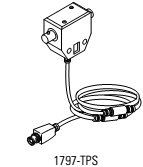
ControlNet Taps: Purpose and Wiring Context
ControlNet is an industrial network that uses coaxial media and a trunk-and-drop (bus) topology. In practical installations, “taps” are the physical connection points that let you attach a node (device) to the ControlNet trunk cable while maintaining controlled impedance and consistent network characteristics. ControlNet taps are not optional accessories; they are a fundamental part of how a ControlNet segment is built, and they materially affect reliability. A properly selected and installed tap helps keep the trunk continuous, provides a defined connection for the drop cable to the node, and supports predictable signal integrity over the installed length.
In ControlNet terminology, the trunk is the main coaxial cable run, and the drop is the short connection from a tap to the device. Taps are designed to support these roles. The tap body includes trunk connectors (through path) and a drop connector (to the node). Depending on the mechanical constraints of the panel, cabinet, or machine, different tap body styles (T and Y; straight and right-angle) are used to make routing easier, reduce strain on cables, and improve serviceability.
In commissioning and troubleshooting, ControlNet tap selection is often overlooked. However, many intermittent ControlNet issues can be traced back to physical-layer problems: improper trunk terminations, loose connectors, drop lengths outside recommended guidelines, or damaged tap bodies/connectors. Treat the tap as a critical component of the physical layer, similar to how you would treat termination resistors on an RS-485 segment or proper connectorization in a fiber link.
Understanding T-Taps vs Y-Taps
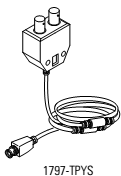
The ControlNet taps are available in two body types to accommodate the connections that you need to make for your installation. The Y and T connections are aptly named as they describe the look of the connector. While both types accomplish the same functional goal (trunk continuity plus a drop to the node), the mechanical geometry impacts how you route cables, especially in congested enclosures.
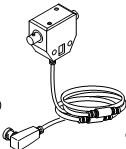
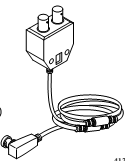
A T-tap is commonly used when the trunk runs past the tap location in a straightforward line and the drop can be taken off at 90 degrees without creating sharp bends. A Y-tap can be useful when cable routing needs a smoother split or when the physical routing makes a “Y” path more natural. Right-angle variants exist to minimize depth and prevent trunk connectors from protruding where clearance is limited.
Termination Components and Network Stability
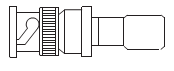
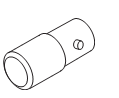
ControlNet segments require correct termination at the ends of the trunk. The table below includes a trunk terminator (for intrinsically safe connectors) and a tap terminator. In practice, termination-related issues are common causes of unstable or non-functional segments. A missing or incorrect terminator can cause reflections and degraded signal quality, which may present as intermittent communication, node drops, or difficulty scheduling/control of network traffic.
In addition to trunk termination, it is important to verify that unused tap ports (where applicable) are protected and that connectors remain clean and mechanically secure. In industrial environments, vibration and maintenance access can loosen bayonet or threaded couplings over time. A disciplined maintenance approach—visual inspection, re-torque/check of connections during scheduled downtime, and documentation of trunk layout—can improve long-term reliability.
See the table below:
|
Controlnet Taps |
||
|
Type |
Description |
Image |
|
1797-TPS |
Straight T-Tap |
|
|
1797-TPYS |
Straight Y-Tap |
|
|
1797-TPR |
Right-Angle T-tap |
|
|
1797-TPYR |
Right-Angle Y-Tap |
|
|
1797-XT |
Terminator, Trunk, for ControlNet Intrinsically Safe Connector |
|
|
1797-TCAP |
Tap Terminator |
|
Practical Installation Guidance
When installing taps on a ControlNet trunk, aim for consistency and documentation. Identify the trunk endpoints, confirm terminators are installed at the correct locations, and label each tap/drop with its destination device. For right-angle taps, ensure there is adequate clearance so the trunk connectors are not forced into a tight bend, which can stress the connector and cable over time.
During commissioning, if a network shows intermittent node behavior, do not immediately assume a controller or device configuration issue. Verify physical layer first:
- Confirm trunk termination is present and correct at both ends of the segment.
- Inspect taps for secure mechanical lock and correct cable seating.
- Check drop cables for damage and for routing that avoids sharp bends or crushing.
- Temporarily simplify the network by disconnecting drops to isolate a problematic tap/drop.
- Verify any intrinsically safe segments use the correct connector/terminator hardware as specified.
This approach generally isolates issues faster than software-only troubleshooting because ControlNet performance is highly dependent on signal integrity and consistent impedance along the trunk.
Frequently Asked Questions (FAQ)
Q1: What is the main purpose of a ControlNet tap?
A tap provides a controlled and serviceable way to connect a device (via a drop cable) to the ControlNet trunk while maintaining trunk continuity and consistent physical-layer characteristics.
Q2: When should I use a T-tap vs a Y-tap?
Both can work electrically, but the selection is usually mechanical. Choose the body style that supports clean cable routing, adequate bend radius, and good service access. Right-angle variants are typically used when enclosure depth or clearance is limited.
Q3: Do ControlNet trunks require termination?
Yes. Proper termination at the ends of the trunk is required to control reflections and maintain signal integrity. Missing, incorrect, or misplaced terminators are common causes of unstable networks.
Q4: What is a tap terminator used for?
A tap terminator is used in specific configurations to properly terminate a tap port or tap-related segment as defined by the installation requirements. Always follow the network design and equipment documentation to ensure the intended termination strategy is implemented.
Q5: What are typical symptoms of a physical-layer issue on ControlNet?
Intermittent node dropouts, devices disappearing and reappearing, difficulty establishing or maintaining network schedule/communication, and faults that change when cables are moved are all indicators that the trunk/tap/drop physical layer should be inspected.